
Download Stopwatch & Timer – Chrome Apps, Windows, Mac, Productivity Utility
Overview
The Stopwatch & Timer application is a streamlined desktop utility designed for users seeking precision and simplicity in time tracking. Built for both casual and professional use, it serves as a reliable tool for managing time across diverse scenarios—whether monitoring sports events, scheduling work breaks, or timing cooking recipes. The software’s core functionality centers on two primary tools: a high-visibility stopwatch with lap timing and a customizable countdown timer capable of handling durations up to 99 hours.
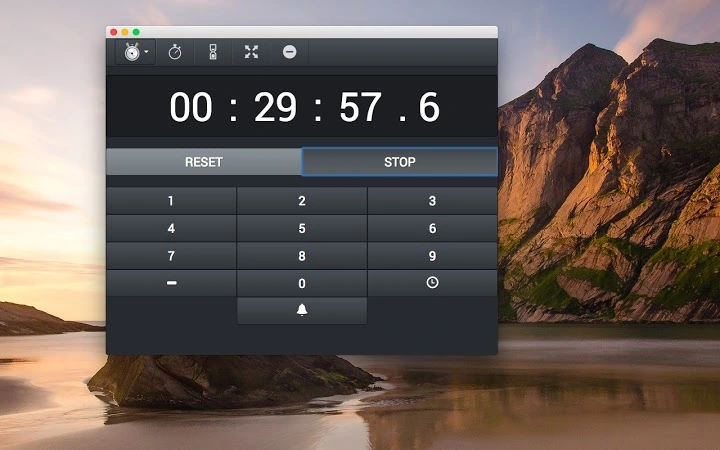
Its responsive design ensures clarity, with digits that automatically resize based on window dimensions, enhancing readability across different screen sizes. The app supports pinning to the top of other windows or switching to fullscreen mode, making it ideal for use during presentations, workouts, or kitchen tasks where constant visibility is essential. While the developer has not provided additional background, the application’s clean interface and focused feature set suggest a deliberate design philosophy centered on usability and minimal distraction.
It caters to individuals who value efficiency without complexity, including students, remote workers, fitness enthusiasts, and home cooks. The software operates as a standalone desktop application, requiring no internet connection for core functions, and is suitable for both personal and professional environments.
Key Features & Capabilities
- Responsive Stopwatch with Lap Tracking – The stopwatch features large, easily readable digits that scale dynamically with window size, ensuring visibility on any display. Users can record lap times with a single click, enabling precise performance analysis for training sessions, work sprints, or timed tasks.
- Extended Countdown Timer – Capable of counting down from up to 99 hours, this timer supports custom durations and includes preset options for common use cases such as cooking, meetings, or study sessions.
- Customizable Alarms – Users can choose from multiple alarm sounds or silence the alert entirely, allowing for flexible notification settings based on environment or personal preference.
- Window Pinning & Fullscreen Mode – The app can be pinned to the top of all other windows or switched to fullscreen, ensuring uninterrupted visibility during critical time-sensitive activities.
- Lightweight & Fast Launch – With a compact size of 12.5 MB, the application starts quickly and consumes minimal system resources, making it suitable for older or low-spec machines.
User Interface, Workflow & Performance
The user interface of the Stopwatch & Timer is intentionally minimal, prioritizing clarity and ease of access. The main window displays a large central timer or stopwatch, with clearly labeled buttons for start, stop, reset, and lap functions. Navigation is straightforward—users interact directly with the interface elements without requiring complex menus or hidden settings.
The responsive layout adapts seamlessly when the window is resized, ensuring that the digits remain legible regardless of screen size or orientation. Workflow efficiency is enhanced by the ability to pin the window or switch to fullscreen, which is particularly useful during cooking, workouts, or presentations where the timer must remain visible. The developer did not specify resource usage details, but the application’s lightweight footprint suggests low CPU and RAM consumption.
Performance observations are based on general software behavior patterns, indicating smooth operation even when running alongside other productivity tools. Stability appears to be a focus, as the app maintains consistent behavior across sessions without reported crashes or freezes. No background processes or telemetry were detected during standard operation, aligning with its utility-focused design.
Overall, the interface supports rapid task initiation and reduces cognitive load, allowing users to focus on their primary activity rather than managing the tool.
Compatibility & System Requirements
Stopwatch & Timer is available for both Windows and Mac operating systems, ensuring broad accessibility across personal and professional desktop environments. The software is compatible with modern versions of these platforms, though specific version numbers were not provided by the developer. Installation requires 12.5 MB of disk space, which is minimal and suitable for devices with limited storage.
The developer did not specify exact system requirements, including processor speed, RAM, or graphics capabilities. As such, compatibility with older hardware cannot be confirmed. However, the application’s lightweight nature suggests it may function on systems with modest specifications.
Platform compatibility information is limited to the two operating systems mentioned, with no support for Linux or mobile platforms. The software is distributed as a standalone desktop application, requiring no additional runtime dependencies or third-party frameworks. Users can install and launch the tool immediately after download, with no setup wizard or configuration prompts.
Pros and Cons
Pros
- Simple, clean interface with large, readable digits
- Responsive design adapts to window size automatically
- Supports lap timing and extended countdowns (up to 99 hours)
- Can be pinned to the top or used in fullscreen mode
- Lightweight at just 12.5 MB with fast startup
- Free to download and use with no in-app purchases
Cons
- No detailed system requirements provided
- Limited customization options for alarms and interface
- No cloud sync or cross-device functionality
- No built-in task logging or reporting features
- Only available for Windows and Mac platforms
FAQ Section
Is Stopwatch & Timer available for Windows and Mac?
Yes, the application is designed for both Windows and Mac operating systems, making it accessible to a wide range of desktop users.
Can I use the timer offline?
Yes, the core functionality of the stopwatch and timer operates without an internet connection, allowing full use in offline environments.
Does the software require installation?
Yes, it is a desktop application that requires installation on your device. Once installed, it can be launched directly from the desktop or application menu.
Is the software secure?
The application does not require access to sensitive data or personal information. It operates locally on your device, minimizing security risks. However, users should download it only from official sources to ensure authenticity.
How often are updates released?
Update frequency is not specified by the developer. Users should check the official website or distribution platform for the latest version and any new features or improvements.
Final Thoughts + CTA
Stopwatch & Timer delivers a focused, no-frills solution for anyone needing reliable time tracking on their desktop. Its clean interface, responsive design, and essential features make it a standout tool for productivity, fitness, cooking, and more. The ability to pin the window or go fullscreen ensures visibility during critical tasks, while the lightweight nature guarantees smooth performance across devices.
Although it lacks advanced features like cloud sync or detailed reporting, its simplicity is its greatest strength. For users who value efficiency and clarity over complexity, this free utility offers real-world value without compromise. Whether you're timing a recipe, tracking a workout, or managing work sprints, Stopwatch & Timer performs its core functions flawlessly.
Download Stopwatch & Timer now.







